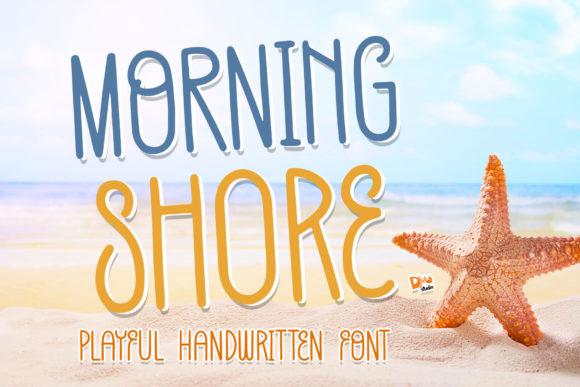
Morning Shore: A Playful Script Handwritten Font for Modern Web Design
As a web designer working on a new coaching website, I wanted to find a font that felt approachable, human, and visually engaging. The brand voice was warm, intuitive, and creative—so I started testing display fonts that could reflect that personality. That’s when I came across Morning Shore, a playful and natural handwritten font. Whether you’re using it for crafts, digital designs, presentations, or making greeting cards, this font has the potential to become your favorite. I decided to try it in a hero section, over a soft image banner, and within a call-to-action area to see how it performed in a live layout.
Morning Shore for Website Headers and Hero Sections
Morning Shore immediately stood out when I applied it to the hero headline. Its script handwritten style gave the site a personal, handcrafted feel without looking overly casual or messy. The font has a natural flow and organic texture that mimics real handwriting, making it perfect for headers where you want to inject warmth and authenticity. On a coaching website, this helped reinforce the brand’s message of connection and trust.
I used Morning Shore at 48px on desktop and scaled it down to 32px on mobile, ensuring it remained legible without overwhelming the layout. The spacing between letters felt intuitive, and the font held up well over a light gradient overlay, which is important when placing text over images.
How Morning Shore Handles Readability on Mobile
One of my concerns with using a decorative handwritten font like Morning Shore was readability on smaller screens. After testing it in a responsive layout, I found that it worked best when used sparingly—especially in navigation menus or buttons where the text is short. For longer headlines or subheaders, it performed well as long as there was enough contrast between the text and background.
On mobile, I paired it with a clean sans serif for body text to maintain a strong visual hierarchy. This helped preserve the font’s personality while ensuring the site remained easy to scan and accessible across devices.
Morning Shore for Digital Branding and Logo Design
Because of its expressive style, Morning Shore also works well in logo design and brand identity projects. I tested it as a logo treatment for a boutique online store focused on handmade goods. The font’s playful and organic character aligned perfectly with the brand’s artisanal aesthetic. I adjusted the kerning slightly to give it a polished look and used it in a muted earth tone to keep it feeling modern yet grounded.
This script handwritten font isn’t just for logos—it can be used across digital brand kits, social media graphics, and even packaging design mockups. Since it’s a downloadable font with multiple styles, it’s easy to integrate into both web and print assets.
Using Morning Shore in Call-to-Action Buttons
I also tried using Morning Shore in a call-to-action button for a course landing page. Because of its expressive nature, it worked best in short phrases like “Start Today” or “Join the Journey.” I made sure to increase the letter spacing slightly and use a solid background color to keep the text from blending into the background.
For accessibility, I tested it with a screen reader and found that while it worked visually, it’s best paired with a more legible sans serif in assistive contexts. Still, as a decorative accent in CTA buttons, it added a sense of warmth and intentionality that helped guide the user’s eye.
Morning Shore for Blog Graphics and Social Media Headers
Another use case I explored was using Morning Shore in blog headers and social media graphics. Since it’s a display font, it’s ideal for short titles, quote graphics, and featured image overlays. I uploaded a test image with Morning Shore over a light textured background and found that it stood out clearly without looking forced.
This script handwritten font works especially well for bloggers, course creators, and digital entrepreneurs who want to add a personal touch to their visual content. It’s lightweight and loads quickly, which is important for maintaining fast page speeds on content-heavy sites.
Font Pairing Tips with Morning Shore
One of the best ways to use Morning Shore effectively is by pairing it with a clean, modern sans serif or serif font. For the coaching website, I paired it with a light-weight sans serif like Open Sans for body copy and navigation links. This created a nice contrast between the expressive headline and the more functional supporting text.
If you’re building a more editorial-style layout, such as a blog or portfolio homepage, consider pairing Morning Shore with a serif font like Merriweather or Playfair Display for a more elevated look. The key is to balance the decorative nature of the handwritten font with something more structured and readable.
Morning Shore for Greeting Cards and Print-on-Demand Projects
Although I was working on a web project, I couldn’t help but notice how well Morning Shore would translate to print. Its natural strokes and soft curves make it a great choice for greeting cards, invitations, and product packaging. As a digital product creator, I often design assets that need to work across both web and print formats, and Morning Shore delivered that flexibility.
Since it’s available in multiple file formats and includes alternates and ligatures, it’s easy to customize for different use cases. I especially appreciated the multilingual support when testing it with international clients who needed non-English characters.
Licensing and Webfont Availability
Before embedding Morning Shore into the live site, I made sure to check the font’s licensing terms. It’s important to confirm that the font is approved for commercial use, especially when working with client websites or online stores. I was happy to find that it includes a commercial license and is available in webfont formats like WOFF and WOFF2, which are optimized for fast loading and cross-browser compatibility.
If you’re planning to use it on a Shopify store, WordPress site, or landing page builder like Webflow or Elementor, be sure to verify that the font files are properly hosted and that you’re not violating any redistribution clauses.